> ## Documentation Index
> Fetch the complete documentation index at: https://shipmagic-docs.speedysquirrelhq.com/llms.txt
> Use this file to discover all available pages before exploring further.
# How to Find the ID of a Product Collection
> Look up the numeric ID Shopify assigns to a collection
The **Product Collection** condition matches on a collection's numeric **ID**, not its name. Every collection in Shopify has a unique number, and you can read it straight from the URL.
## Finding the ID
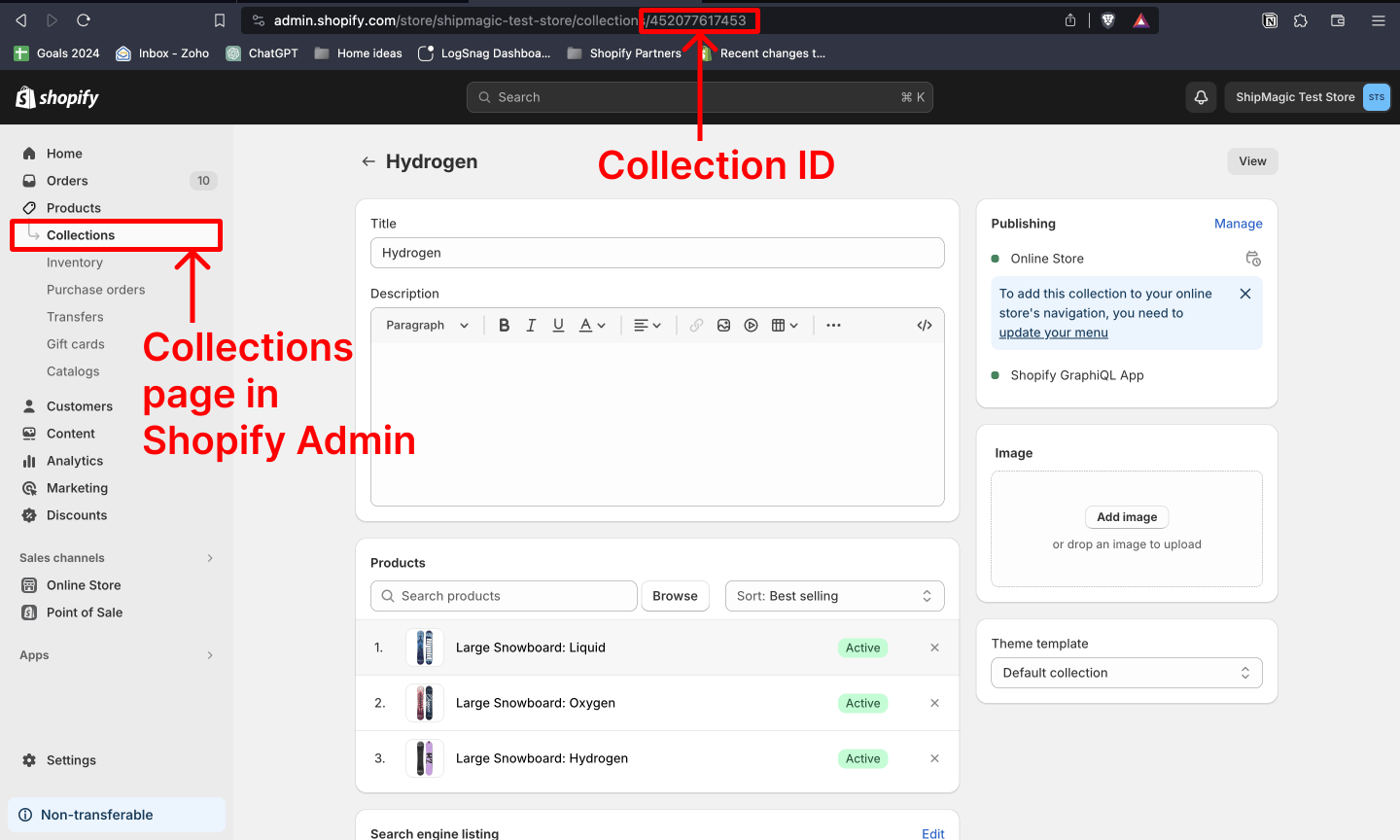
Go to **Products → Collections** and click the collection you want.
The URL looks like this:
```text theme={null}
https://admin.shopify.com/store/your-store/collections/123456789
```
The trailing number — `123456789` — is the collection ID.
 ## Related
The Product Collection condition and the rest of the customization attributes.
Which condition set exposes Product Collection.
The other codes ShipMagic conditions expect.
Finding a rule ID, and copying a rule.
## Related
The Product Collection condition and the rest of the customization attributes.
Which condition set exposes Product Collection.
The other codes ShipMagic conditions expect.
Finding a rule ID, and copying a rule.